Log Events
Overview
This guide shows you how to log events in your game.
Events provide insight on what is happening in your game, such as user actions, system events, or errors.
SohaGame SDK automatically logs some events, but some events need you to integrate manually.
Before you begin
- You will need to Integrate the SohaGame SDK for iOS into your game.
List of events to integrate
Required events
1. create_character: Log this event when creating a character and entering the game successfully (Required)
[SohaKit logCreateCharacterWithName:role_name
                    roleID:role_id
                    roleLevel:role_level
                    serverID:server_id];
Note: The create_character event is triggered only once when the character is successfully created.
2. set_role: Log this event after selecting character or level up (Required)
Make sure to provide all required information: AreaId(serverID), RoleID, RoleName, RoleLevel
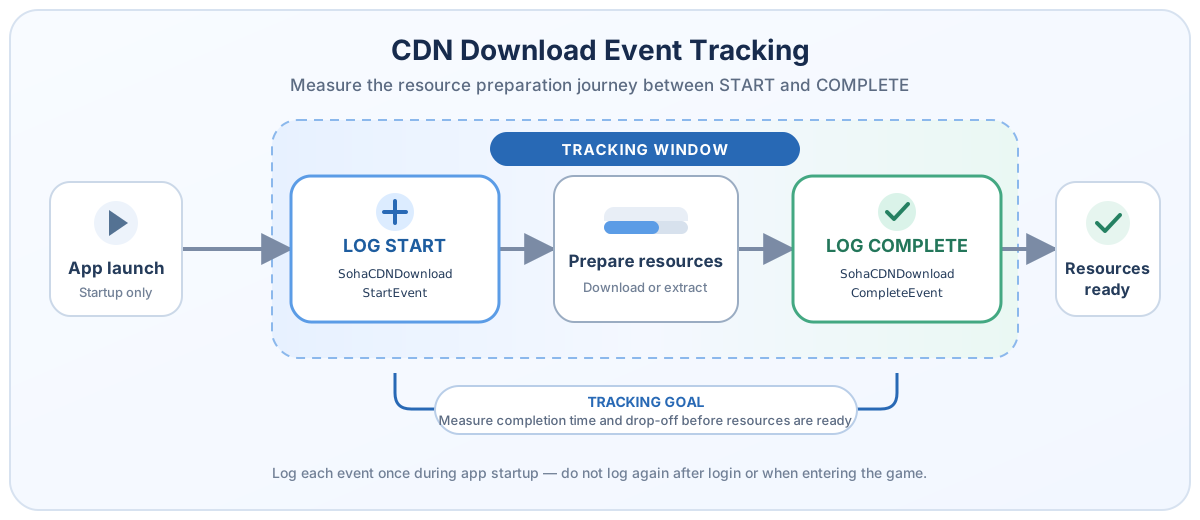
3. CDN Download Event Tracking
Trigger SohaCDNDownloadStartEvent once when the app is launched and the CDN preparation process begins (either CDN download or resource extraction if no download is required). Trigger SohaCDNDownloadCompleteEvent when the process completes successfully and all resources are ready. These events only need to be logged during app startup and should not be triggered again after user login or when entering the game.
// Logs a start event immediately,
// then logs a complete event after the CDN download is complete.
[SohaKit logCustomEvent:SohaCDNDownloadStartEvent];

// Simulate the actual CDN download process
[SohaKit logCustomEvent:SohaCDNDownloadCompleteEvent];
These events are used to measure user drop-off during the resource preparation stage after app launch and identify whether users leave before or after resource loading is completed.
Optional events
Custom event